Blinky!
The classic “hello world” of firmware is getting a single LED to blink. It sounds trivial, but under the hood it touches a surprising number of the ideas from the previous section: pin muxing, clock configuration, memory-mapped peripherals, and the super loop. This section walks through building and understanding the blinky application provided in the vega-quickstart repository.
Note
If you really want to have fun, it is recommended to download the RV32M1 reference manual and look through the related sections of the manual as you read through everything below.
The RV32M1 SDK
Blinking an LED by poking 0x48020000 directly (as we discussed in the previous section) works, but things will quickly get out of hand without better abstraction. As soon as you want a second GPIO, UART, timer, etc, you’re either re-reading the reference manual every session (it’s over 4000 pages!) or copy-pasting definitions across files. This is why chip vendors ship a software development kit (SDK): a collection of headers and drivers that wrap the raw peripheral registers in named structs and helper functions.
For the RV32M1, that SDK is the rv32m1-sdk.
The quickstart repository pulls this SDK in as a git submodule at vega-quickstart/rv32m1-sdk. If you cloned the quickstart without --recurse-submodules, the directory will be empty and every build will fail with “no such file” errors. To populate it, run the following from inside vega-quickstart:
git submodule update --init --recursive
Once populated, the layout underneath rv32m1-sdk/ looks roughly like this:
rv32m1-sdk/
├── devices/RV32M1/
│   ├── RV32M1_ri5cy.h               CMSIS-style definitions for every peripheral
│   ├── system_RV32M1_ri5cy.c        very early startup (SystemInit)
│   ├── gcc/startup_RV32M1_ri5cy.S   reset handler and vector table
│   ├── drivers/                     fsl_gpio, fsl_clock, fsl_lpuart, ...
│   └── utilities/                   debug console, printf, logging
├── boards/rv32m1_vega/              board-specific pin maps and vendor examples
├── RISCV/                           RISC-V specific intrinsics and CSR helpers
└── middleware/                      FreeRTOS, USB stack, etc (we ignore this)
Note
Fun fact: The
fsl_prefix on every driver file is a legacy remnant of Freescale Semiconductor, a company NXP acquired in 2015. It stands for “Freescale Software Library” and persists in here since NXP originally maintained this SDK.
Peeking inside a driver
Although not totally necessary for you to follow the rest of the training, let’s trace one call from the blinky application down to the bare-metal register write we saw last section. This will help you understand how to read and interact with the SDK source in the case that you want to develop your own applications in the future.
The application toggles the LED with:
GPIO_TogglePinsOutput(BOARD_LED_GPIO, 1u << BOARD_LED_GPIO_PIN);
BOARD_LED_GPIO is defined in the app’s own board.h as GPIOA, and BOARD_LED_GPIO_PIN is 24. The symbol GPIOA itself is defined deep in devices/RV32M1/RV32M1_ri5cy.h as:
#define GPIOA_BASE  (0x48020000u)
#define GPIOA       ((GPIO_Type *)GPIOA_BASE)
In English: GPIOA is just a pointer to a GPIO_Type struct laid out at address 0x48020000. The GPIO_Type struct is carefully declared so that its fields land exactly on top of the PDOR, PSOR, PCOR, PTOR, PDIR, and PDDR registers from the memory map (we looked at this in the previous section). Peek into drivers/fsl_gpio.h and the toggle helper is a single-line inline function:
static inline void GPIO_TogglePinsOutput(GPIO_Type *base, uint32_t mask) {
    base->PTOR = mask;
}
So GPIO_TogglePinsOutput(GPIOA, 1u << 24) compiles down to exactly the same store we wrote by hand in the previous section: a single 32-bit write of 0x01000000 to address 0x4802000C. The SDK is not doing anything magical here. It is giving us names for the same bits. The same pattern holds for GPIO_PinInit, GPIO_SetPinsOutput, and GPIO_ClearPinsOutput: each one is a thin wrapper over a single register access, and the compiler inlines and optimizes the function away.
Note
As we can see, an SDK is really just a readability layer, not a runtime.
Everything you write eventually comes down to a load or store instruction against a fixed address, and when something misbehaves you can (and should) open the driver source and read what it actually does.
Writing our first program
Our first application will be a small blinky program, you can find it under apps/blinky/ in the vega-quickstart repository:
apps/blinky/
├── board.h    pin and peripheral definitions
├── board.c    pin mux, clock, and UART setup
└── main.c     the main application logic and loop
board.c
Three functions are near the top of main.c, each of these come from board.c and are somewhat complex (relative to the rest of main.c).
BOARD_InitPins handles pin muxing. Physical pins on the RV32M1 package can be routed to several different peripherals: the same pin can act as GPIOA24, an analog input, or some set of other alternate functions. Selection is done by setting a handful of bits (the MUX bits) in the PORTA register block.
Note
You can find (a rather complicated) table of “pinouts” (definitions of all pin multiplexing options) in Section 23.3 of the reference manual.
Before we can drive the LED, we have to tell the chip that pin 24 of port A is a GPIO (as opposed of any of the other options). The function also enables the clock to PORTA and PORTC and routes PTC7 and PTC8 to LPUART0’s RX (receive) and TX (transmit) lines, since the debug console needs those pins.
BOARD_BootClockRUN configures the chip’s clock tree. Out of reset, the CPU is running from the internal Fast Frequency Internal Reference Clock (FIRC) oscillator.
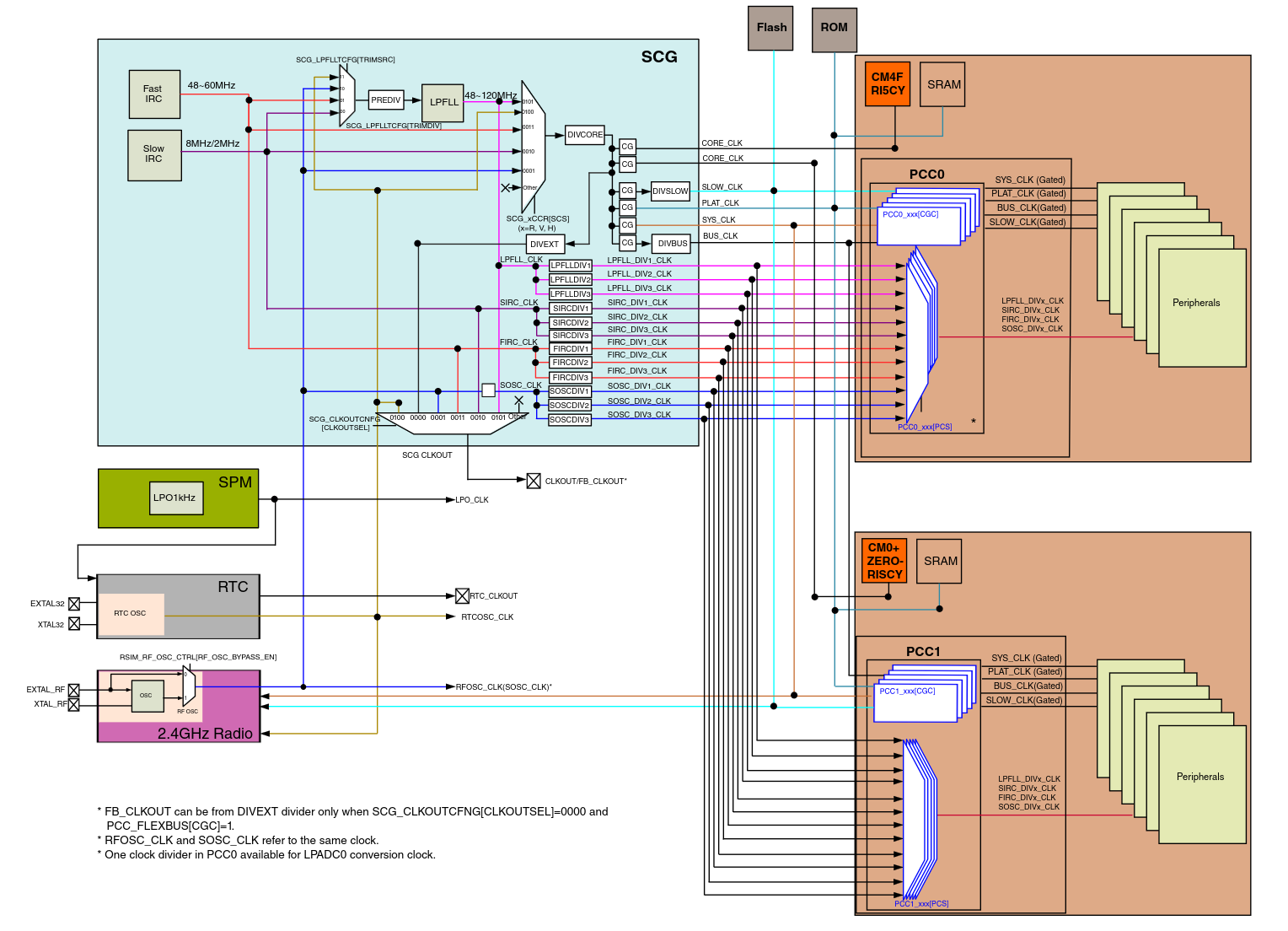
For our simple blinky application, we don’t care that much about what speed the clock is running at. However, in most/all real applications you really must have clocks at a known speed and various peripheral dividers set up correctly; every peripheral, communication protocol, timer, and even the power utilized by the board relies on proper management and knowledge of clocks.
BOARD_InitDebugConsole points LPUART0’s clock source at the FIRC and hands the peripheral to the SDK’s debug console module at 115200 baud. Once this is done, any PRINTF() in the program will go out of pin PTC8 (LPUART0 TX) as serial data.
Note
“Baud” is the transmission/receiving rate of a serial interface in symbols per second. Because UART uses simple binary signaling where each symbol encodes exactly one bit, 115200 baud means 115200 bits per second (11520 bytes/characters per second) on the wire. A faster baud rate means faster communication between the two connected points.
Almost none of the code in board.c is what you would write from scratch for every project. You can usually just write it once per board and then mostly ignore, which is exactly what we’ve done here.
Note
The version in
apps/blinky/board.cis a trimmed-down adaptation of the vendor example atrv32m1-sdk/boards/rv32m1_vega/driver_examples/gpio/led_output/ri5cy/, rewritten to keep only what blinky actually uses.
main.c
#include "board.h"
#include "fsl_debug_console.h"
#include "fsl_gpio.h"

static void delay(void) {
    volatile uint32_t i;
    for (i = 0; i < 800000; ++i)
        __asm("NOP");
}

int main(void) {
    gpio_pin_config_t led_config = { kGPIO_DigitalOutput, 0 };

    BOARD_InitPins();
    BOARD_BootClockRUN();
    BOARD_InitDebugConsole();

    PRINTF("\r\nRV32M1-VEGA RI5CY baremetal app\r\n");

    GPIO_PinInit(BOARD_LED_GPIO, BOARD_LED_GPIO_PIN, &led_config);

    PRINTF("Starting to blink LED...\r\n");
    while (1) {
        delay();
        GPIO_TogglePinsOutput(BOARD_LED_GPIO, 1u << BOARD_LED_GPIO_PIN);
    }
}
Before entering the loop, main runs three board-level setup calls (imported via board.h), prints a banner over the UART, and configures pin 24 of GPIOA as a digital output with an initial value of 0 (LED off). After that it loops forever, waiting a bit and then toggling the LED.
A few things are worth calling out:
- The
delay()function is a busy loop, not a real timer (we’ll learn more about those in a later section)delay()blocks the CPU in a tightforwith an inlineNOP. The inlineNOPensures the compiler doesn’t optimize the loop away- The
volatilequalifier oniis for the same reason: without it, an optimizing compiler might notice that nothing depends oniand delete the whole loop - As we noted earlier, busy-looping is a bad long-term habit (it wastes power and blocks the CPU from doing anything useful), but for a first program it’s the easiest way to provide delays between our toggles
- The
PRINTFmacro is not theprintffrom the C standard library (since we don’t have a standard library for our bare-metal code). It expands to the SDK’s ownDbgConsole_Printf, which writes bytes out over LPUART0 one at a time- LPUART0 is connected to the J12 USB port on the physical VEGAboard, we’ll learn how to view the serial output in later sections
The flow of execution
Now that we’ve seen every piece, we can tie them together into the full path a single blink takes:
- Reset brings the CPU up running from the Fast Frequency Internal Reference Clock (FIRC), executes the startup assembly in
startup_RV32M1_ri5cy.S, zeroes.bss, copies.data, and callsmain. BOARD_InitPinswrites to PORTA and PORTC mux registers so pin 24 is GPIO and pins PTC7/PTC8 are LPUART0.BOARD_BootClockRUNsets the system clock to 48 MHz through using FIRC.BOARD_InitDebugConsoleprepares LPUART0 so that subsequentPRINTFcalls can emit characters.GPIO_PinInitwrites1 << 24into GPIOA’s PDDR register, marking that pin as an output.- The main super loop runs forever:
delay()burns a few hundred thousand NOPs worth of cycles, thenGPIO_TogglePinsOutputwrites0x01000000to GPIOA’s PTOR register, which flips bit 24 of PDOR in hardware, in turn toggling the LED.
Step 6 is the entirety of our application logic doing “useful work”. Everything else is just (largely generic) initial setup.
Compiling our program
Turning main.c into something that can run on the VEGAboard is a multi-stage process:
- Compile each
.cinto an object file with a cross-compiler - Assemble the startup code, link everything against a linker script that knows the chip’s memory layout
- Finally, convert the ELF output into a raw binary for flashing
Building manually
If you wanted to build everything entirely by hand (we don’t recommend it), the invocation would look something like this (shortened for readability):
# From vega-quickstart/
SDK=rv32m1-sdk
DEV=$SDK/devices/RV32M1
BOARD=$SDK/boards/rv32m1_vega

riscv32-unknown-elf-gcc -march=rv32imc -O0 -g -ffreestanding -fno-builtin \
    -DCPU_RV32M1_ri5cy -D__STARTUP_CLEAR_BSS \
    -I apps/blinky -I $DEV -I $DEV/drivers -I $DEV/utilities \
    -I $SDK/RISCV -I $SDK/devices \
    -c apps/blinky/main.c -o main.o
# ... repeat for board.c, system_RV32M1_ri5cy.c, fsl_gpio.c, fsl_clock.c,
#     fsl_msmc.c, fsl_lpuart.c, fsl_common.c, fsl_debug_console.c, etc.

riscv32-unknown-elf-gcc -march=rv32imc \
    -c $DEV/gcc/startup_RV32M1_ri5cy.S -o startup.o

riscv32-unknown-elf-gcc -march=rv32imc \
    -T $BOARD/driver_examples/gpio/led_output/ri5cy/riscvgcc/RV32M1_ri5cy_flash.ld \
    -ffreestanding -nostdlib -Xlinker --gc-sections \
    -Xlinker -z -Xlinker muldefs \
    -o blinky.elf main.o board.o startup.o ... \
    -Wl,--start-group -lm -lc -lgcc -lnosys -Wl,--end-group

riscv32-unknown-elf-objcopy -O binary blinky.elf blinky.bin
Note:
riscv32-unknown-elf-gccis a cross-compiler: it runs on your laptop but emits RISC-V instructions.- The
-march=rv32imcflag tells the compiler which subset of the RISC-V ISA to target: 32-bit base integer (i), multiply/divide (m), and compressed 16-bit encodings (c), which matches what the RI5CY core on the VEGA implements.
- The
-ffreestanding -fno-builtin -nostdlibtell GCC that no hosted C runtime exists. There is no operating system to provide memory allocators, a standard library, etc. The compiler must not assume that callingprintfcan reachstdout, and the linker must not pull in startup code from libc.- The linker script (
RV32M1_ri5cy_flash.ld) tells the linker where flash and RAM are located (in terms of memory addresses), which section goes where, and where the vector table has to be placed for the CPU to find it at reset.- Errors or incorrect addresses in the linker script may lead to immediate hard-faults the instant the board starts…such errors can be very hard to debug - try to use vendor-provided linker scripts whenever possible.
- The final
objcopycall strips the ELF formatting off the compiled code. The resulting.binis a flat dump of what the flash contents should look like.
Using the Makefile
Doing all of the above is not fun, especially since you need to do it every time you make changes and need to recompile. Thankfully, you don’t have to; the quickstart repository’s top-level Makefile wraps all of the above into a single command:
make blinky
The build output lands in build/blinky/:
build/blinky/
├── blinky.elf    full ELF with debug info
├── blinky.bin    flat binary
├── blinky.hex    Intel HEX
├── main.o
├── board.o
└── ... (all the other .o and .d files)
Note
At the end of a successful build the Makefile also runs
riscv32-unknown-elf-sizeon the ELF, printing thetext,data, andbsssizes. Those numbers are useful as a rough check of size. For example, our bare blinky app should just be a few kilobytes oftextat most. If you suddenly see it balloon in size, something you may not have intended may have snuck in.
The Makefile is organized so that adding a new application is just a matter of dropping a new directory under apps/ with one or more .c files inside. Running make <appname> builds it, make flash-<appname> builds and flashes it (covered in the real-hardware section next), and make sim-<appname> builds and runs it inside Renode (covered in simulating hardware section later). If a given application needs different compiler flags or extra SDK drivers, you can add an apps/<name>/config.mk file to override the relevant variables without touching the top-level build rules.
From here on out, no need to run compilation commands by hand, just use make! However, now when you make <app> and it prints a wall of compile lines and a final size breakdown, you know exactly what each of those lines is doing and why - awesome!
RISC-V aside: C extension
Now that we’ve compiled our first program, let’s take this as a chance to learn an interesting RISC-V specific detail.
If you take a look at the primary Makefile, you’ll notice we build every app with -march=rv32imc. The -march flag tells the compiler which RISC-V base ISA and extensions to target. In our case, it’s the 32-bit integer base (i), the multiply/divide extension (m), and the C extension (c) for compressed instructions, which lets the compiler emit 16-bit forms of common operations. Most of main will be 4-byte forms, but small moves and stack adjustments often can be shrunk to just 2 bytes when this extension is specified/supported.
You can see this by disassembling with GDB:
riscv32-unknown-elf-gdb -q -batch -ex 'disass /r main' build/blinky/blinky.elf
Look at the prologue of main. You’ll see lines like:
0x000003fa <+0>:  01 11           addi  sp,sp,-32     # 2-byte c.addi
0x000003fc <+2>:  06 ce           sw    ra,28(sp)     # 2-byte c.swsp
0x00000404 <+10>: 23 24 f4 fe     sw    a5,-24(s0)    # 4-byte sw
The instruction in the third column is the standard mnemonic; the raw bytes tell you the encoded length, two bytes for compressed forms and four for the full-width encoding. With the C extension, we get a bunch of small savings that together add up to a potentially significant decrease in binary size. A typical RV32IMC binary is roughly 20-30% smaller than the same code without c, which is why almost every microcontroller-class RISC-V chip enables it. We’ll come back to this in future sections, when we have to read trap-handler disassembly with both forms mixed together.
TLDR
- The RV32M1 SDK ships as a git submodule at
vega-quickstart/rv32m1-sdk. Populate it withgit submodule update --init --recursivebefore building. - SDK helpers like
GPIO_TogglePinsOutputare thin inlined wrappers over a single register store. They give the raw peripheral bits readable names without adding runtime cost. - The blinky app is one big super loop: initialize pins, clocks, and the UART; then forever delay and toggle GPIOA pin 24. All three init calls (
BOARD_InitPins,BOARD_BootClockRUN,BOARD_InitDebugConsole) are board scaffolding you write once and ignore thereafter. - Building for the VEGAboard uses the
riscv32-unknown-elf-cross-toolchain with-march=rv32imcand a vendor-supplied linker script, producing an.elfand.bin. The top-levelMakefilewraps all of this behindmake <app>. - The
-march=rv32imcflag selects the RISC-V base ISA and extensions:i(32-bit integer base),m(multiply/divide), andc(compressed instructions). The C extension lets the compiler emit 2-byte forms of common operations alongside the standard 4-byte ones, shrinking a typical binary by 20-30%.